Civilizations and Nomads
Your first settlement
Read the map and research selection in the lobby. Start with the Starter Guide: find water, arrange a reliable food supply and build shelter before spending resources on expansion. Agree with your faction on who will gather supplies, build and research. The Research Guide explains the technology tree and its crafting gates.
“I’m cold and starving, WHAT DO I DO?”
- A confused player
What is Civilizations and Nomads mode?
In Nomads, everyone spawns without any predetermined roles or Factions. The map is a complete wilderness, ready to be explored and settled. There are no prebuilt structures, except for occasional ancient ruins.
You can stay factionless (a nomad), create your own faction, or join an existing one. Only members of a faction can research new technologies and accumulate research points.
A land has several peoples, each speaking its own language, which a speaker of a different language cannot understand at first. On most lands you choose your people when you arrive; see Peoples and Languages.
There is no predetermined goal.
What will each civilization desire? Military power? World domination? Scholars with advanced technology? Mass resource output and production? Commerce and trade? Raiding? It’s up to you or your leaders to decide!
What is RP Map mode?
In the RP mode, everyone chooses a role to play as before spawning. There may be one or more preset factions. The map has some prebuilt structures, but there is also plenty of space to expand with new buildings.
The map sets the era, starting technology and research rules. Check the round briefing before assuming research is available or that the technology rules match a Nomads round.
There may or may not be specific goals, which are listed at the start of the round. A brief outline for goals on different maps where they are present (mostly accumulating points for factions under certain conditions):
- Gulag (1946) - the prisoners - hold as much money as possible within your faction and escape; the camp guard - force the prisoners to work and send out the resources.
- The Art of the Deal (1994) - the company members - arrange deals to acquire disks and money; the police - jail company members and confiscate disks and money.
Maps without a set goal:
- Bohemia (1013) - live in a city in Medieval Europe.
- Colony (1713) - build a New World colony (two maps with different climates).
- Little Creek (1873) - live in a Wild West town.
- Pioneers (1873) - develop a town in the prairies.
What else is there?
There are also other modes and maps which are, effectively, a mix of the previous two modes, with a number of extra features. Currently it includes:
- Tribes - a fantasy mode with several different races (chosen randomly upon spawning), each forming a preset faction.
- Wasteland (2013) - survive in a post-apocalyptic environment (two variations - zombies and nuclear apocalypse).
Becoming Civilized
Perhaps you have noticed that your ability to craft things is a bit limited in comparison to other people, and you would like to make more. Perhaps you are finding surviving alone difficult. Perhaps you enjoy the company and roleplay opportunity that comes with engaging with other players. If those apply to you, then you should consider joining or starting a faction.
The benefits of joining or assembling a faction:
- You gain access to that faction’s research levels, which equates to craft. See The Research Milestones.
- More opportunity to roleplay in a manner you want. From becoming a town’s blacksmith, simple farmer, village idiot, to village chieftain, diplomat, emperor, or anything you want to try and make happen.
- Depending on the faction, you might have access to shared resources and facilities.
- Safety in numbers. Raiders will think twice before attacking a city, whereas a loner is an easy target for burglars, thieves, pillagers, and robbers.
Factions
Factions are basically “teams.” Everyone in the same faction shares the same research points, and everyone in the faction contributes to everyone else when they perform research.
But that also means that lazy people can take advantage of your technology and resources and not contribute a thing.
A small, tight-knit group of contributors is often better off than a large group of slackers that just consume.
Pick your members wisely. Or cunningly use them to your advantage.
Work smart, not hard!
General
- To Create a faction, open the Faction tab and click Create Faction. Choose a name for it and draw your faction’s symbol on the 32x32 canvas, or stamp one of the classic shapes and draw over it. Your banner colours are taken from the drawing. As Leader you can change the symbol later with Modify Faction Symbol on the Faction tab.
- Both symbol canvases have Copy design code and Paste design code. The design code is the symbol written out as text, starting with
C13SYMBOL/, so you can keep it outside the game and use it again for a new faction or on another land. Pasting only fills the canvas: in Modify Faction Symbol, press Save to put it on your banners. A code keeps up to 16 colours; a busier symbol keeps its 16 most used colours. - To join a faction, you must be Recruited by its leader or by a member who has the Recruitment permission, or join through one of its recruitment stations. If you are already in another faction, accepting moves you over and you join as an ordinary member, without any rank or permissions you had before.
- You can leave a faction by clicking Abandon Faction on the Faction tab. Take note, that you will not be able to rejoin the same faction for 24 hours!
- Creating a faction makes you the default Leader.
- Every faction has a member limit: 10 members to begin with, raised by building a faction hall. A full faction cannot take new members, but anyone already counted among its members can rejoin. Your place counts for your account, so it is kept when your character dies; it is freed when you abandon the faction or after two weeks without playing a member.
Faction halls
A faction grows by building a hall. Craft a faction hall seat from 20 wood planks (in the economy & production category) and place it; the leader clicks it and chooses Designate. Members then hand it materials to raise it, one stage at a time:
| Hall | Members | Needs | Materials |
|---|---|---|---|
| Council fire | 15 | Stone Age | 40 wood, 40 stone |
| Longhouse | 25 | Classical Age, indoors | 150 wood, 100 stone, 30 cloth |
| Town hall | 35 | Medieval Age, indoors | 300 stone, 60 iron, 40 glass |
| Capitol | 50 | Industrial Age, indoors | 600 stone, 150 steel, 80 glass, 20 gold |
From the longhouse on, the hall must stand under a roof. If the hall is destroyed, the faction loses its stages and cannot take in new members beyond 10 until it builds again; nobody is removed. Each colony your faction holds in another land adds room for 5 more members. Examine the hall to see how many members the faction may have and what the next stage needs.
Nations
In the connected lands of the wider world, factions can band together into a nation. Each faction keeps its own leader, research, members and treasury, and factions of one nation can still disagree or fight; the nation is what they stand for together. A nation can hold factions from different lands. Leaders use Nation on the Faction tab:
- Found a nation: stand within a few steps of the leader of another faction from your land, name the nation, and both agree. You become its head.
- Apply to a nation: the leaders of its member factions vote. Over half of them saying yes admits you; half or more saying no refuses you. An application not decided within 3 days lapses.
- Vote for a head: the head speaks for the nation, chosen when over half of the member factions agree. It gives no power over the other factions.
- Secede: leave at any time. Your faction cannot apply to that nation again for 3 days. A nation left with one faction dissolves.
Answers arrive within a few minutes, once the lands have conferred. A colony’s members belong to their faction’s nation, but only the leader in the faction’s own land can act for it. Examining someone shows which nation they are a citizen of.
A nation holds 3 factions at first. To hold more, a member faction builds a nation assembly: craft a nation assembly seat from 30 wood planks (economy & production), place it in your faction’s own land and Designate it, then members hand it materials like a faction hall:
| Assembly | Factions | Needs | Materials |
|---|---|---|---|
| Meeting ground | 4 | Classical Age | 120 wood, 120 stone |
| Assembly hall | 6 | Medieval Age, indoors | 400 stone, 80 iron, 40 glass, 60 cloth |
| Parliament | 8 | Industrial Age, indoors | 800 stone, 200 steel, 100 glass, 40 gold |
The best assembly any member faction keeps standing counts. If it burns or loses its roof, the nation can take in fewer factions, but no faction is removed.
Starting with your faction
Once you have joined a faction in character, your new characters can start with it. When you join the round, you are asked whether to start here, on your own or with your faction. Choosing your faction starts you beside one of its recruitment stations, already a member. You cannot start with a faction you have never joined in play, and the faction needs a placed recruitment station with free space beside it.
Recruitment stations
On maps that allow custom factions, a faction can take members through a recruitment station instead of recruiting each person by hand. Craft one from 10 planks (in the economy & production category) and place it. The leader then clicks it and chooses Designate for my faction, and the station takes the faction’s colours. Only the leader can release it again.
-
Joining: click a station to see the faction’s rules and whether you meet them. Depending on the rules you can Join straight away or Apply with a short introduction. You can Withdraw an application at any time. If it is approved, come back to a station and Confirm and join. You must not be in another faction to apply.
-
Reviewing: the leader and members with the Recruitment permission can approve, reject or revoke applications at any station of their faction, or from anywhere with Recruitment Applications on the Faction tab. They can give a reason, which the applicant sees. Applicants and reviewers are told about new decisions when they log in.
-
Rules (leader only): the leader chooses the mode:
- Closed stops new applications.
- Review every application sends every application to the queue. New stations start in this mode.
- Accept matching applicants at once lets players who meet the rules join immediately.
Further rules set a required language and minimum skill levels (0-10) in crafting, farming, medical and combat. Players who don’t meet the rules either still go to review or cannot apply, as the leader chooses. Open recruitment sets the language and skill rules aside, so everyone eligible counts as matching. Automatic acceptance needs open recruitment or at least one rule.
-
Applications and approved offers expire after 7 days. Dying ends that character’s application.
Family and adoption
On Nomads maps you can right-click someone next to you and choose Offer Adoption. If they accept, their last name becomes yours. An adopted character can use Un-adopt Yourself in the IC tab to get their original name back. You cannot adopt someone who is already adopted, and you need a last name to offer.
As a Leader
- You can invite people to your faction by getting close to them, right-clicking them, and selecting Recruit from the menu.
- You cannot force someone to leave your faction; They have to abandon it themselves. How to get them to do that, is up to you…
- You can set a lower member limit than your hall allows with Set Member Limit on the Faction tab. Members already counted keep their place.
- You can make someone else a Leader by clicking Transfer Leadership on the Faction tab while near to your successor.
- You can rename a faction you founded with Rename Faction in the Faction panel (on maps that allow custom factions). For the next 8 seasons, the Faction List, examining a member and examining your banners and posters show that it was recently renamed, and from what.
- You can split your members into fire teams with Roster in the IC tab. Click a team number next to a person to put them in that team, none to take them out, or lead to make them the team’s leader. Teammates you can see show a numbered badge (gold for the leader), and examining someone shows their team. The tracker arrow points fire team members to their fire team leader. Fire teams are kept with each character when the server restarts.
- You can choose Rally Point in the IC tab to plant a rally point where you stand. For ten minutes your members’ tracker arrow points to it. Any member can right-click something they see and choose Spot Enemy to warn the faction. See Spotting enemies and rally points.
- You can jail someone: right-click a closed door and choose Cell Timer to hold it shut for 1 to 30 minutes. Nobody can open it until the time is served, then it opens by itself and everyone nearby hears it click. Examining the door shows the time left, and the time carries over when the server restarts. Use Cell Timer again to release the prisoner early. The door can still be broken down.
- You can make Announcements that are received by every member of your faction. Open the Officer tab and select Faction Announcement.
- You can delegate your power to other faction members by giving them certain officer permissions. Right-click a member of your faction and select Faction Perms. These are the permissions you can give or revoke, if the person already has them:
- Permission Management - lets them give or revoke Announcements and Giving Titles. Only the leader can hand out Permission Management and Recruitment.
- Announcements
- Giving Titles
- Recruitment - lets them invite people into the faction. It does not make them a leader: they get no treasury, tax or permission powers.
As a Member
- You can ask the leader to give you officer permissions.
- Members with the Recruitment permission can recruit new members while the leader is away.
- Anyone in the faction can become a new leader if the current one is dead, by clicking Become Faction Leader on the Faction tab.
Research
For rounds using the newer tech-tree mode, use the Research guide. The sections below describe legacy modes; their point-pool rules do not describe the tech tree. Always check the lobby’s selected mode.
Research is one of the most important aspects of Civilizations and Nomads. It is with it that your faction can unlock new craftables and better equipment!
A small faction with advanced research and guns can usually topple the large group of Stone Age characters armed with bows and arrows.
Research methods depend on the map and lobby selection. For technology-tree progression, requirements and crafting gates, use the Research Guide. The following sections describe the other research selections.
Research mode is voted at the lobby before the game begins.
Classic Research
The original research method! And the most tedious.
Use a Research Kit on Scientific Literature, Scientific Rock Slate, Scientific Books, or Bookcases.
You can make those with the following materials: wood, bamboo, stone, sandstone and marble.
The points you get depend on how advanced the person who wrote the literature was, and what the subject of their writing is.
If you are struggling with your own research, it might be a good idea to see if any neighboring factions will let you study their bookcases. Buy, trade, and negotiate access to them to boost your research. Or fight them, rob them… get creative (within the rules).
Auto Research
As the name suggests, all factions in the world gain the same amount of points in all areas at the same rate, without doing anything.
Sit back and relax. Or go plan a war against that one guy who looked at you funny.
Just remember, if you can make guns, so can they…
The world keeps advancing age by age, past the Modern Age into the Digital Age (2026), with its smartphones, drones, lithium-ion batteries, LED lighting and 3D printers.
Resource-Based Research
In this mode, you create a Research Bench with wood, place any items on it, and select a category to research.
This means that this mode rewards productivity and exploitation of natural resources. No slacking off!
Different items are worth different amounts.
Experiment!
Chad Mode
It started as a joke, now it’s too late to go back…
Chad Mode uses no research progression. Read the mode briefing and server rules for its roleplay and combat rules; the research selection does not waive server rules.
Chad Mode+
Just like Chad Mode, but with research! To do chad research, build an Altar of Chad. Using living or dead characters on the altar provides research points; follow the mode briefing and server rules. Living are worth 12, dead are worth 8.
If a faction member is sacrificed to advance a certain category of research, that faction loses all their research points in that category!
No Research
In this mode, you’re stuck in the epoch you started in, with all technology of that epoch unlocked. The lobby offers starts from the Bronze Age up to the Digital Age (2026), the newest age, which comes after the Modern Age.
Research mechanics won’t yield any improvements.
The Research Milestones
A list of the most important technology that you’ll unlock, and at what research level. This is just a list of major milestones- For the full list of craftables (over 700!) with all the costs and necessary research levels, check Full Crafting List.
Industrial
- 8: forks, knives, spoons. copper coins, Copper hatchet & spear (requires 8 in Military too)
- 14: chair, wood chest, bookcase, target dummy
- 15: dice, bow
- 17: gold and silver hatchets and spears (requires 16 points in Military too)
- 18: coin pouch. floors, wood walls, doors
- 19: roman sandals, loom, pipe, mill, dehydrator, barrel, pen, foldable canopy
- 21: water well, bronze hatchet, spear, shield, and battle axe (requires 16 points in Military too)
- 22: rolling pin, mop, drinking glass, small bottle
- 24: diamond hatchet and spear (requires 30 points in Military too)
- 25: anvil
- 25: comfy chair (requires 25 points in Health too)
- 26: furnace
- 27: iron tools, spear and shield (requires 16 points in Military too)
- 28: lanterns, doors, keys, coffins
- 29: fortified walls
- 33: iron brazier, iron pot, table, oven
- 39: medieval leather shoes
- 41: coffin, wardrobe
- 43: gravestone
- 45: paper, violin
- 47: crosses
- 49: wine glass
- 50: steel hatchet and spear (requires 44 points in Military too)
- 52: printing press
- 55: black leather shoes, black leather boots, leather boots (requires 25 points in Health too)
- 85: gunpowder pouch, bandolier
- 90: bakelizer
- 95: canner, tin cans
- 96: Global Exchange
- 105: oil well
- 141: 2-way radio, portable radio
- 178: walkie-talkie radio
- 235 (Digital Age): smartphone, LED panel, lithium-ion battery bank, 3D printer
Military
- 12: bone armor
- 14: wood shield
- 15: leather armor
- 21: bronze chest plate (requires 34 points in Industrial too), wood sarissa, wood dory
- 32: mechanical trap
- 33: catapult, catapult projectiles, siege ladder (requires 24 points in Industrial too)
- 34: copper small sword (requires 18 points in Industrial too), bronze small sword (requires 27 points in Industrial too)
- 39: pike, halberd (requires 33 points in Industrial too)
- 42: copper spadroon (requires 18 points in Industrial too), bronze spadroon (requires 27 points in Industrial too)
- 46: telescope
- 49: Fire Lance, Stone Bullets
- 56: Hand Cannon
- 62: Arquebus
- 70: Matchlock Musket
- 80: iron bullets, cannon balls
- 79: cannon (requires 71 points in Industrial too)
- 235 (Digital Age): drone controller, quadcopter drone, payload drone
Health
- 15: ancient clothing
- 18: wood peglegs, wood feet
- 19: bandages
- 23: cigars & cigarettes
- 24: teapot, teacup (requires 49 points in Industrial too)
- 25: ancient hats
- 26: bronze surgery tools (requires 18 points in Industrial too)
- 28: bedsheets
- 29: opium
- 38: medieval clothing
- 43: burn kit
- 44: splints (requires 35 points in Industrial too)
- 48: doctor handbook (requires 33 points in Industrial too)
- 51: operating table (requires 25 points in Industrial too)
- 52: 1713’s hats
- 55: retractor, bone saw, scalpel, bone setter. (requires 35 points in Industrial too)
- 56: trauma kit
- 57: Jackets and vests
- 59: Renaissance clothing
- 67: cautery, hemostat (requires 35 points in Industrial too)
- 79: Colonial clothing, Colonial coats
- 89: Industrial Jackets & Vests
- 98: Industrial Hats & Clothes
- 109: Modern Hats
- 112: Modern Jackets, Vests & Outfits
- 130: custom camo uniform
- 145: NBC suits and hoods
Blacksmithing
- From 313 B.C.: Iron Xiphos, Iron Gladius, ancient armors and helmets
- From 1013: Steel small sword, steel spadroon, Iron small sword, spadroon and longsword, medieval armors and helmets
- From 1713: Steel swords, Iron swords, Flintlock Muskets
- From 1873: Lever-Action Rifles, Single-Action Revolvers
Gunsmithing
- From 1903: Bolt Actions, Revolvers, Small semi-auto guns (pistols)
- From 1943: Full-Auto Guns, Semi-Auto Rifles
- From 1969: Selective-Fire Guns
Environments
The environment lives and breathes and will be the single biggest factor that influences your life!
Each map has either a single biome or several different ones.
There are seasons of the year, effects of which are different in every biome. Some biomes have four seasons, while others have only two.
On large maps with multiple biomes each biome has its own list of plants that could be grown there. Many plants also grow only in certain seasons. See the Guide to Farming.
To determine the biome you are in, read the descriptions below and look at your surroundings. Looking at the map of Pangea that has almost every biome may also help. From top to bottom: Tundra, Taiga (roughly the southern half of the snowed area, before the northern mountains), Temperate, Semi-Arid, Desert, Savanna, Jungle. The one biome missing is Sea.
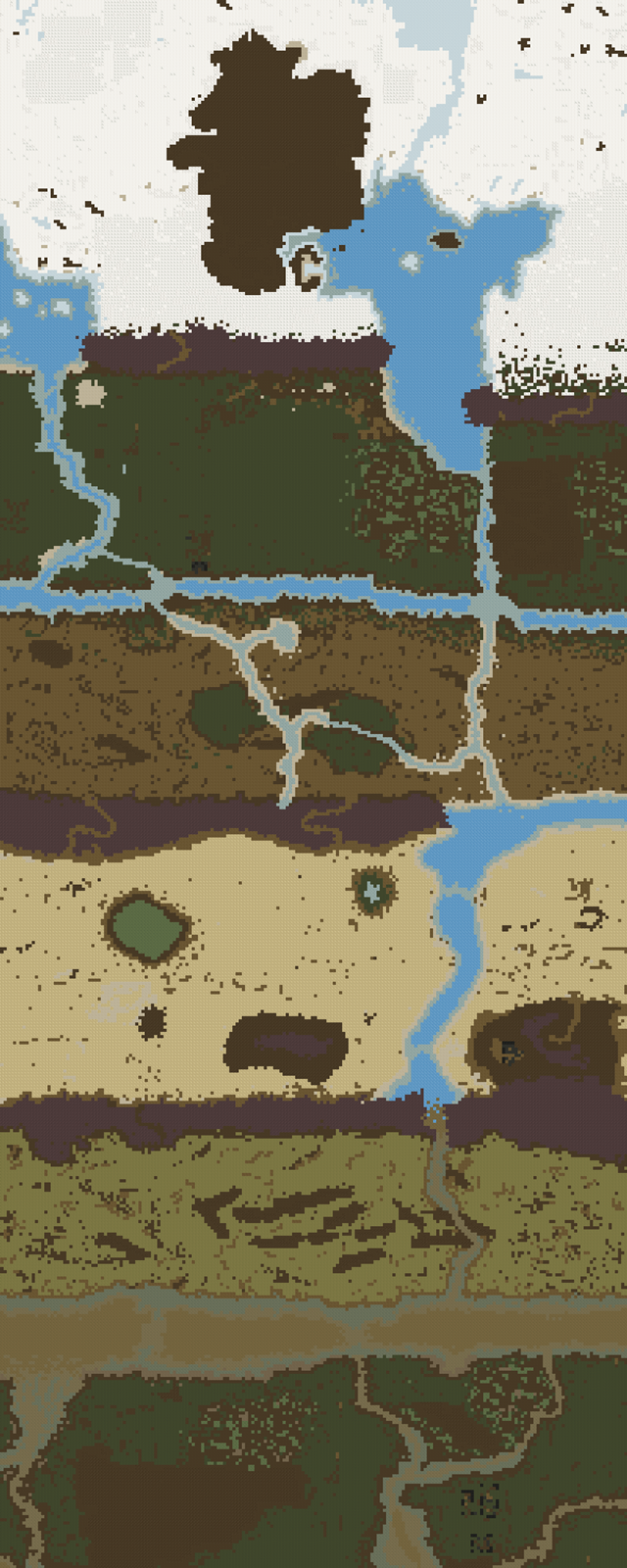
Biomes and seasons
Tundra
- Snow covers the ground all year round and does not melt during summer (unlike in Temperate).
- Trees and animals are somewhat rare here.
Seasons:
- Summer: Mild temperatures, some snow melts, revealing dirt, and crops can grow. No chance of snowfall or blizzard. Wild animals respawn.
- Winter: Icy temperatures that require a coat, a high chance of snowfall, and a chance of deadly blizzard. Crops stop growing and snow covers all land. Have a shelter ready or you probably won’t survive until summer.
Taiga
Similar to Tundra in many regards, but considerably more trees.
Temperate
Plenty of trees and grassy meadows (“wild grass” tiles).
Seasons:
- Spring: Mild temperatures, a little leftover snow from the winter. Sparse rains cause mud slowdowns. Snow starts melting.
- Summer: Hot temperatures, no rain. Chance of heat-waves that evaporate all puddles. All snow melts. Wild animals respawn at a faster rate.
- Fall: Cooler temperatures, sparse rain and occasional snowfall will slow you down.
- Winter: Icy temperatures can kill you without a fur coat, some lakes and rivers freeze over, allowing you to walk on them. Constant snowfall slows you down, crops will not grow and animals won’t respawn. Chance of blizzards that cause a whiteout, and can kill you even with fur coats. Have a shelter ready!
Sea
Smaller islands on larger maps usually have this biome.
Semi-Arid
Large expanses of dry dirt with occasional groves.
Desert
Sand. Lots of sand.
Seasons:
- Dry Season: All the water sources dry up, has a chance of sandstorms, which impair vision, but cause no other ill-effects. Heat is intense and can harm you if you stay in the sun too long.
- Wet Season: All water sources fill up, sandstorms die down. Wild animals respawn.
Savanna
Wide plains covered with sunburnt dry grass. Acacia trees are a common sight here.
Jungle
Lush vegetation with massive jungle trees and large bushes; thick jungle grass covers the ground.
Seasons:
- Dry Season: Fertile floodplains on the riverbanks are uncovered, sunny weather most of the time.
- Wet Season: Heavy rains and the arable land along the rivers is flooded.
Nomads maps
See Nomads Maps.